
In this post I will be discussing Astra Finance: what it is, why it matters, how it is useful, my use cases and some quirks with it. We will be specifically looking at their consumer app
Disclaimer
Before we go any further, there is a weird aspect of Astra that you need to be aware of. Astra is not and is not associated with a bank so they are not FDIC insured. Even though they are only transferring your money, they are not able to directly send it from one account to an other. Instead they must hold the money in an account in your name for a brief period of time (typically no more than an hour).
If during this brief time Astra were to go under, your funds could be at risk. The account that your money is in is under your name but it is not FDIC insured. I personally am not too worried as I am usually transferring less than a hundred dollars each.
It looks like the original source of this in Astra’s FAQ has been removed, but here is the Wayback version of the page
What is Astra?

As they describe it, Astra transfers cash between your checking and savings accounts, so you don’t have to. Basically, they sync with any bank account that you have (that supports Plaid) and allow you to set up automated transfers based on customizable criteria.
The best part? Astra is completely free to use!
Why use Astra?
There are many great high yield savings accounts (HYSAs) that have limits to the amount of funds they give interest on. If you were to max these accounts out, when the interest hits you would have to manually log into each and transfer out the amount that is over the limit. Astra can do this automatically for you.
Another use case is keeping a minimum amount in an account. Astra can automatically fund an account for you based on an account balance floor.
How do you use Astra?
Once you create an account and link the banks you want to make transfers to/from, routines will provide the functionality we are looking for. Routines are the automated transfers that make Astra so powerful. Routines can be many different types which I will describe below
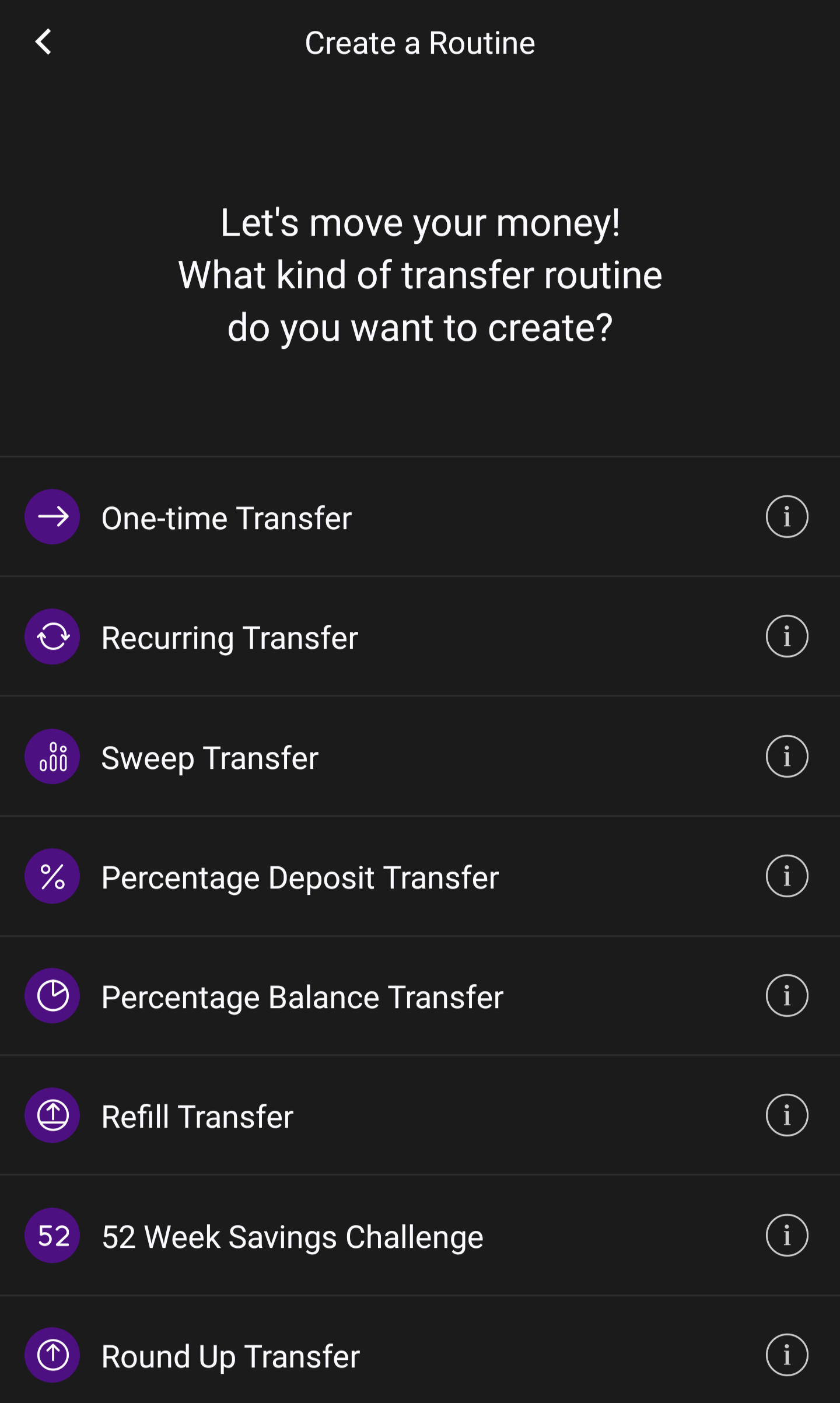
Few things to note before we get into it:
- Transfer amounts are limited to $1,000. You can message support to increase this, but keep the disclaimer in mind.
- Some accounts have an available and a total/current balance. When setting up balance amounts in these routines, Astra will be checking against the available balance (the lower of the two)
One-time Transfer
This is self explanatory. You choose a source account, a destination account, a date and a transfer amount. You can later invoke this exact routine whenever you want
Recurring Transfer
You choose a source account, a destination account, a start date, a transfer amount and a frequency (week, two-weeks or month). This routine will be invoked automatically every time the routine is set to occur
Sweep Transfer
This is an incredibly powerful tool which I have the most use for. You choose a source account, a destination account, a start date, a “funds over” amount and a frequency (week, two-weeks or month).
This transfer will poll your source account on the set interval and check to see if the available balance is greater than the “funds over” amount. If it is, it will trigger the routine for however much over the “funds over” amount your account is. For example, if my “funds over” amount is $500 and the source account is at $510 and the routine is ran, it will transfer $10 to my destination account
Note: the $1,000 limit does not apply to Sweep transfers. Whatever the amount is Astra will transfer over
Percentage Deposit Transfer
You choose a source account, a destination account, a start date, a “deposits over” amount, a transfer percentage and a frequency (week, two-weeks or month). This routine is ran on every deposit made to the source account, checks if the amount is over the “deposits over” amount and if it is, transfer the transfer percentage of that amount to the destination.
You could use this to transfer all deposits made to an account by setting the transfer percentage to 100%
Percentage Balance Transfer
You choose a source account, a destination account, a start date, a transfer percentage and a frequency (week, two-weeks or month). On the recurring frequency specified, this routine will transfer a percentage of your entire source account balance to the destination account
Refill Transfer
You choose a source account, a destination account, a start date, a transfer amount and a “go below” amount. This routine will poll your destination account periodically to see if it is below the “go below” amount and fund it with the transfer amount from your source account
52 Week Savings Challenge
This is a new one I have not looked into a lot. You choose a source account, a destination account, a start date, and a starting amount ($1, $2, $3, $4 or $5). On week 1 it will transfer the starting amount. Week two it will transfer two times the starting amount and so on for 52 weeks
Round Up Tranfer
You choose a spending account, a source account, a destination and a start date. This routine will monitor all spending (unsure if this includes transfers) on the spending account, round up all the charges to a whole number for a given week and on Monday transfer the sum from the source account to the destination account.
My Use Cases
Below will be a few of my routines that I have set up and the reasons why I am utilize them.
Varo

Varo has a weird quirk where if your savings balance is over $5k you will earn no interest on the whole balance. This will ensure the account never gets over that threshold
Netspend
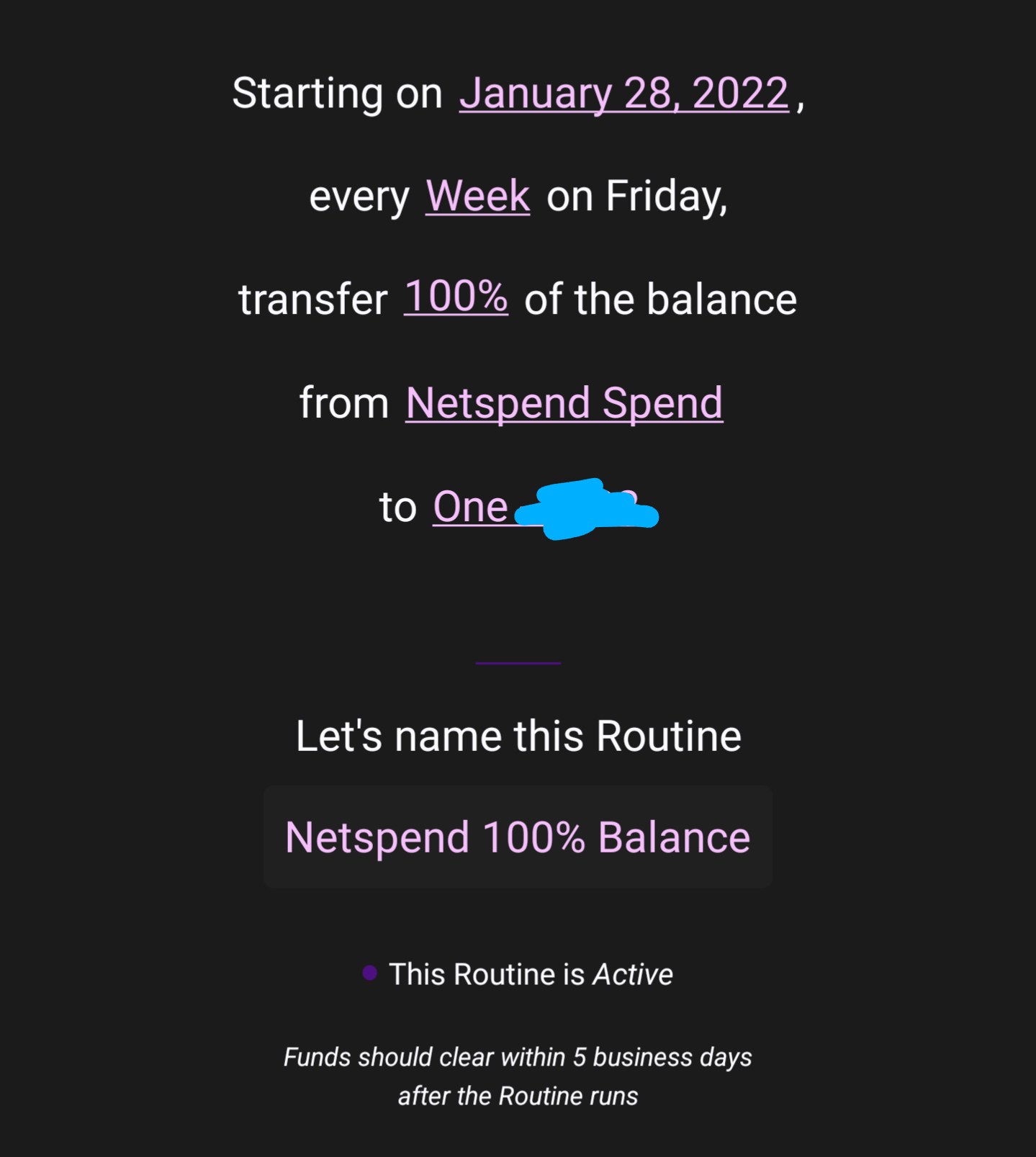
Netspend does not let you withdraw from your savings accounts. So I manually log in and transfer the funds to the “checking” portion of the account. This routine will then pull that amount out and put it to my main checking (One)
Current

The Pods only earn interest up to $2k each. The interest is deposited into the Pods even if they are already at $2k. The Pods cannot be added to Astra so I set up daily automated transfers within Current to move the interest over the threshold from the Pods to my main checking account. This routine then will move the funds from that checking to my main checking
Quirks
- You can only add one account from each bank. This may seem obvious but things like Netspend and HEB Debit accounts offer HYSAs but are both managed by Netspend in the back end. Astra will only let you add one Netspend account so you can only choose one to automate
- Astra transfers take a while (3-6 days). They have to withdraw the funds to an intermediary account then transfer it to the destination account
- DCU has been broken in Plaid for a while now so you can’t set them up in Astra. Not an Astra issue but a DCU issue
Direct Deposits
For some accounts, Astra deposits show up as direct deposits. This could be useful to meet DD requirements for accounts or for SUBs. Below are confirmed to see Astra deposits as DDs
- One Finance
- Current
- Varo
Below are confirmed to not see Astra deposits as DDa
- Albert
- Onjuno
- SoFi
If you wish to contribute to this list add a comment below!
 Personal Finance
Leave a comment